

ospf 區域分類詳細
發布時間:2022-07-26 文章來源:xp下載站 瀏覽:
|
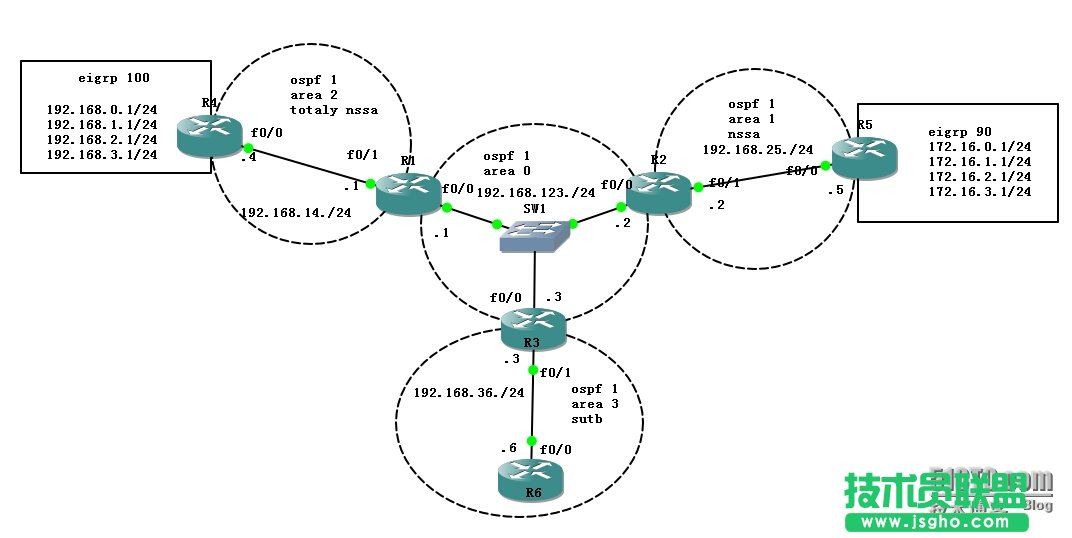
網絡技術是從1990年代中期發展起來的新技術,它把互聯網上分散的資源融為有機整體,實現資源的全面共享和有機協作,使人們能夠透明地使用資源的整體能力并按需獲取信息。資源包括高性能計算機、存儲資源、數據資源、信息資源、知識資源、專家資源、大型數據庫、網絡、傳感器等。 當前的互聯網只限于信息共享,網絡則被認為是互聯網發展的第三階段。 我們知道ospf中有幾種區域類型:stub ,totally stub ,nssa ,totally nssa. 下面分別講一下各種區域類型對路由的改變,實驗圖如下:
按如圖配置好相關接口和參數,配置好后,查看R6路由如下: O IA 192.168.123.0/24 [110/20] via 192.168.36.3, 00:00:04, FastEthernet0/0 1.0.0.0/32 is subnetted, 1 subnets O IA 1.1.1.1 [110/21] via 192.168.36.3, 00:00:04, FastEthernet0/0 2.0.0.0/32 is subnetted, 1 subnets O IA 2.2.2.2 [110/21] via 192.168.36.3, 00:00:04, FastEthernet0/0 O IA 192.168.14.0/24 [110/30] via 192.168.36.3, 00:00:04, FastEthernet0/0 3.0.0.0/32 is subnetted, 1 subnets O 3.3.3.3 [110/11] via 192.168.36.3, 00:00:04, FastEthernet0/0 O IA 192.168.25.0/24 [110/30] via 192.168.36.3, 00:00:05, FastEthernet0/0 4.0.0.0/32 is subnetted, 1 subnets O IA 4.4.4.4 [110/31] via 192.168.36.3, 00:00:05, FastEthernet0/0 5.0.0.0/32 is subnetted, 1 subnets O IA 5.5.5.5 [110/31] via 192.168.36.3, 00:00:05, FastEthernet0/0 6.0.0.0/32 is subnetted, 1 subnets C 6.6.6.6 is directly connected, Loopback0 172.16.0.0/24 is subnetted, 4 subnets O E2 172.16.0.0 [110/20] via 192.168.36.3, 00:00:05, FastEthernet0/0 O E2 172.16.1.0 [110/20] via 192.168.36.3, 00:00:05, FastEthernet0/0 O E2 172.16.2.0 [110/20] via 192.168.36.3, 00:00:05, FastEthernet0/0 O E2 172.16.3.0 [110/20] via 192.168.36.3, 00:00:05, FastEthernet0/0 C 192.168.36.0/24 is directly connected, FastEthernet0/0 O E2 192.168.0.0/24 [110/20] via 192.168.36.3, 00:00:05, FastEthernet0/0 O E2 192.168.1.0/24 [110/20] via 192.168.36.3, 00:00:05, FastEthernet0/0 O E2 192.168.2.0/24 [110/20] via 192.168.36.3, 00:00:05, FastEthernet0/0 O E2 192.168.3.0/24 [110/20] via 192.168.36.3, 00:00:06, FastEthernet0/0 配置R3及R6 area 3 為stub區域: 配置命令為: R3(config-router)#area 3 stub R6(config-router)#area 3 stub 修改完成后,R6路由如下: O IA 192.168.123.0/24 [110/20] via 192.168.36.3, 00:00:04, FastEthernet0/0 1.0.0.0/32 is subnetted, 1 subnets O IA 1.1.1.1 [110/21] via 192.168.36.3, 00:00:04, FastEthernet0/0 2.0.0.0/32 is subnetted, 1 subnets O IA 2.2.2.2 [110/21] via 192.168.36.3, 00:00:04, FastEthernet0/0 O IA 192.168.14.0/24 [110/30] via 192.168.36.3, 00:00:04, FastEthernet0/0 3.0.0.0/32 is subnetted, 1 subnets O 3.3.3.3 [110/11] via 192.168.36.3, 00:00:04, FastEthernet0/0 O IA 192.168.25.0/24 [110/30] via 192.168.36.3, 00:00:05, FastEthernet0/0 4.0.0.0/32 is subnetted, 1 subnets O IA 4.4.4.4 [110/31] via 192.168.36.3, 00:00:05, FastEthernet0/0 5.0.0.0/32 is subnetted, 1 subnets O IA 5.5.5.5 [110/31] via 192.168.36.3, 00:00:05, FastEthernet0/0 6.0.0.0/32 is subnetted, 1 subnets C 6.6.6.6 is directly connected, Loopback0 C 192.168.36.0/24 is directly connected, FastEthernet0/0 O*IA 0.0.0.0/0 [110/11] via 192.168.36.3, 00:00:07, FastEthernet0/0 由此可知stub區域不接收任何外部路由,用一條默認路由替代所有外部路由。 先在R4上查看路由表: O IA 192.168.123.0/24 [110/20] via 192.168.14.1, 00:00:51, FastEthernet0/0 1.0.0.0/32 is subnetted, 1 subnets O IA 1.1.1.1 [110/11] via 192.168.14.1, 00:00:51, FastEthernet0/0 2.0.0.0/32 is subnetted, 1 subnets O IA 2.2.2.2 [110/21] via 192.168.14.1, 00:00:51, FastEthernet0/0 C 192.168.14.0/24 is directly connected, FastEthernet0/0 3.0.0.0/32 is subnetted, 1 subnets O IA 3.3.3.3 [110/21] via 192.168.14.1, 00:00:51, FastEthernet0/0 O IA 192.168.25.0/24 [110/30] via 192.168.14.1, 00:00:52, FastEthernet0/0 4.0.0.0/32 is subnetted, 1 subnets C 4.4.4.4 is directly connected, Loopback0 5.0.0.0/32 is subnetted, 1 subnets O IA 5.5.5.5 [110/31] via 192.168.14.1, 00:00:52, FastEthernet0/0 6.0.0.0/32 is subnetted, 1 subnets O IA 6.6.6.6 [110/31] via 192.168.14.1, 00:00:52, FastEthernet0/0 172.16.0.0/24 is subnetted, 4 subnets O E2 172.16.0.0 [110/20] via 192.168.14.1, 00:00:52, FastEthernet0/0 O E2 172.16.1.0 [110/20] via 192.168.14.1, 00:00:52, FastEthernet0/0 O E2 172.16.2.0 [110/20] via 192.168.14.1, 00:00:52, FastEthernet0/0 O E2 172.16.3.0 [110/20] via 192.168.14.1, 00:00:52, FastEthernet0/0 O IA 192.168.36.0/24 [110/30] via 192.168.14.1, 00:00:52, FastEthernet0/0 C 192.168.0.0/24 is directly connected, Loopback1 C 192.168.1.0/24 is directly connected, Loopback1 C 192.168.2.0/24 is directly connected, Loopback1 C 192.168.3.0/24 is directly connected, Loopback1 在R4和R1上運行以下命令: R2(config-router)#area 2 nssa no-summary R4(config-router)#area 2 nssa no-summary 再次查看路由表: C 192.168.14.0/24 is directly connected, FastEthernet0/0 4.0.0.0/32 is subnetted, 1 subnets C 4.4.4.4 is directly connected, Loopback0 C 192.168.0.0/24 is directly connected, Loopback1 C 192.168.1.0/24 is directly connected, Loopback1 C 192.168.2.0/24 is directly connected, Loopback1 C 192.168.3.0/24 is directly connected, Loopback1 O*IA 0.0.0.0/0 [110/11] via 192.168.14.1, 00:00:19, FastEthernet0/0 由此可知nssa totally 區域去掉所區域間和外部路由 先來查看一下R5路由表: O IA 192.168.123.0/24 [110/20] via 192.168.25.2, 00:35:59, FastEthernet0/0 1.0.0.0/32 is subnetted, 1 subnets O IA 1.1.1.1 [110/21] via 192.168.25.2, 00:35:59, FastEthernet0/0 2.0.0.0/32 is subnetted, 1 subnets O IA 2.2.2.2 [110/11] via 192.168.25.2, 00:35:59, FastEthernet0/0 O IA 192.168.14.0/24 [110/30] via 192.168.25.2, 00:35:59, FastEthernet0/0 3.0.0.0/32 is subnetted, 1 subnets O IA 3.3.3.3 [110/21] via 192.168.25.2, 00:35:59, FastEthernet0/0 C 192.168.25.0/24 is directly connected, FastEthernet0/0 4.0.0.0/32 is subnetted, 1 subnets O IA 4.4.4.4 [110/31] via 192.168.25.2, 00:02:07, FastEthernet0/0 5.0.0.0/32 is subnetted, 1 subnets C 5.5.5.5 is directly connected, Loopback0 6.0.0.0/32 is subnetted, 1 subnets O IA 6.6.6.6 [110/31] via 192.168.25.2, 00:12:47, FastEthernet0/0 172.16.0.0/24 is subnetted, 4 subnets C 172.16.0.0 is directly connected, Loopback1 C 172.16.1.0 is directly connected, Loopback1 C 172.16.2.0 is directly connected, Loopback1 C 172.16.3.0 is directly connected, Loopback1 O IA 192.168.36.0/24 [110/30] via 192.168.25.2, 00:12:47, FastEthernet0/0 O E2 192.168.0.0/24 [110/20] via 192.168.25.2, 00:02:02, FastEthernet0/0 O E2 192.168.1.0/24 [110/20] via 192.168.25.2, 00:02:02, FastEthernet0/0 O E2 192.168.2.0/24 [110/20] via 192.168.25.2, 00:02:02, FastEthernet0/0 O E2 192.168.3.0/24 [110/20] via 192.168.25.2, 00:02:02, FastEthernet0/0 在R2和R5上運行如下命令: R2(config-router)#area 1 nssa R5(config-router)#area 1 nssa O IA 192.168.123.0/24 [110/20] via 192.168.25.2, 00:00:02, FastEthernet0/0 1.0.0.0/32 is subnetted, 1 subnets O IA 1.1.1.1 [110/21] via 192.168.25.2, 00:00:02, FastEthernet0/0 2.0.0.0/32 is subnetted, 1 subnets O IA 2.2.2.2 [110/11] via 192.168.25.2, 00:00:02, FastEthernet0/0 O IA 192.168.14.0/24 [110/30] via 192.168.25.2, 00:00:02, FastEthernet0/0 3.0.0.0/32 is subnetted, 1 subnets O IA 3.3.3.3 [110/21] via 192.168.25.2, 00:00:02, FastEthernet0/0 C 192.168.25.0/24 is directly connected, FastEthernet0/0 4.0.0.0/32 is subnetted, 1 subnets O IA 4.4.4.4 [110/31] via 192.168.25.2, 00:00:03, FastEthernet0/0 5.0.0.0/32 is subnetted, 1 subnets C 5.5.5.5 is directly connected, Loopback0 6.0.0.0/32 is subnetted, 1 subnets O IA 6.6.6.6 [110/31] via 192.168.25.2, 00:00:03, FastEthernet0/0 172.16.0.0/24 is subnetted, 4 subnets C 172.16.0.0 is directly connected, Loopback1 C 172.16.1.0 is directly connected, Loopback1 C 172.16.2.0 is directly connected, Loopback1 C 172.16.3.0 is directly connected, Loopback1 O IA 192.168.36.0/24 [110/30] via 192.168.25.2, 00:00:03, FastEthernet0/0 這時發現沒有默認路由,需運行以下命令: R2(config-router)#area 1 nssa default-information-originate 這時R5路由如下: O IA 192.168.123.0/24 [110/20] via 192.168.25.2, 00:01:57, FastEthernet0/0 1.0.0.0/32 is subnetted, 1 subnets O IA 1.1.1.1 [110/21] via 192.168.25.2, 00:01:57, FastEthernet0/0 2.0.0.0/32 is subnetted, 1 subnets O IA 2.2.2.2 [110/11] via 192.168.25.2, 00:01:57, FastEthernet0/0 O IA 192.168.14.0/24 [110/30] via 192.168.25.2, 00:01:57, FastEthernet0/0 3.0.0.0/32 is subnetted, 1 subnets O IA 3.3.3.3 [110/21] via 192.168.25.2, 00:01:57, FastEthernet0/0 C 192.168.25.0/24 is directly connected, FastEthernet0/0 4.0.0.0/32 is subnetted, 1 subnets O IA 4.4.4.4 [110/31] via 192.168.25.2, 00:01:59, FastEthernet0/0 5.0.0.0/32 is subnetted, 1 subnets C 5.5.5.5 is directly connected, Loopback0 6.0.0.0/32 is subnetted, 1 subnets O IA 6.6.6.6 [110/31] via 192.168.25.2, 00:01:59, FastEthernet0/0 172.16.0.0/24 is subnetted, 4 subnets C 172.16.0.0 is directly connected, Loopback1 C 172.16.1.0 is directly connected, Loopback1 C 172.16.2.0 is directly connected, Loopback1 C 172.16.3.0 is directly connected, Loopback1 O IA 192.168.36.0/24 [110/30] via 192.168.25.2, 00:01:59, FastEthernet0/0 O*N2 0.0.0.0/0 [110/1] via 192.168.25.2, 00:00:06, FastEthernet0/0 網絡的神奇作用吸引著越來越多的用戶加入其中,正因如此,網絡的承受能力也面臨著越來越嚴峻的考驗―從硬件上、軟件上、所用標準上......,各項技術都需要適時應勢,對應發展,這正是網絡迅速走向進步的催化劑。 |
相關文章
下一篇:如何設置磊科路由器?